INTELLIGENT WINDOWS AUTOMATION

Let software see the screen.
Turn complex actions into a workflow.

MacroMax is a visual AutoHotkey alternative, Windows auto clicker and mouse and keyboard macro recorder. Build editable workflows with image recognition, route planning, conditions, loops, AI detection and Agent assistance instead of relying only on scripts or fixed coordinates.

✓ Visual AutoHotkey alternative✓ Image recognition auto clicker✓ Nest visual If / For / While logic✓ AI object detection
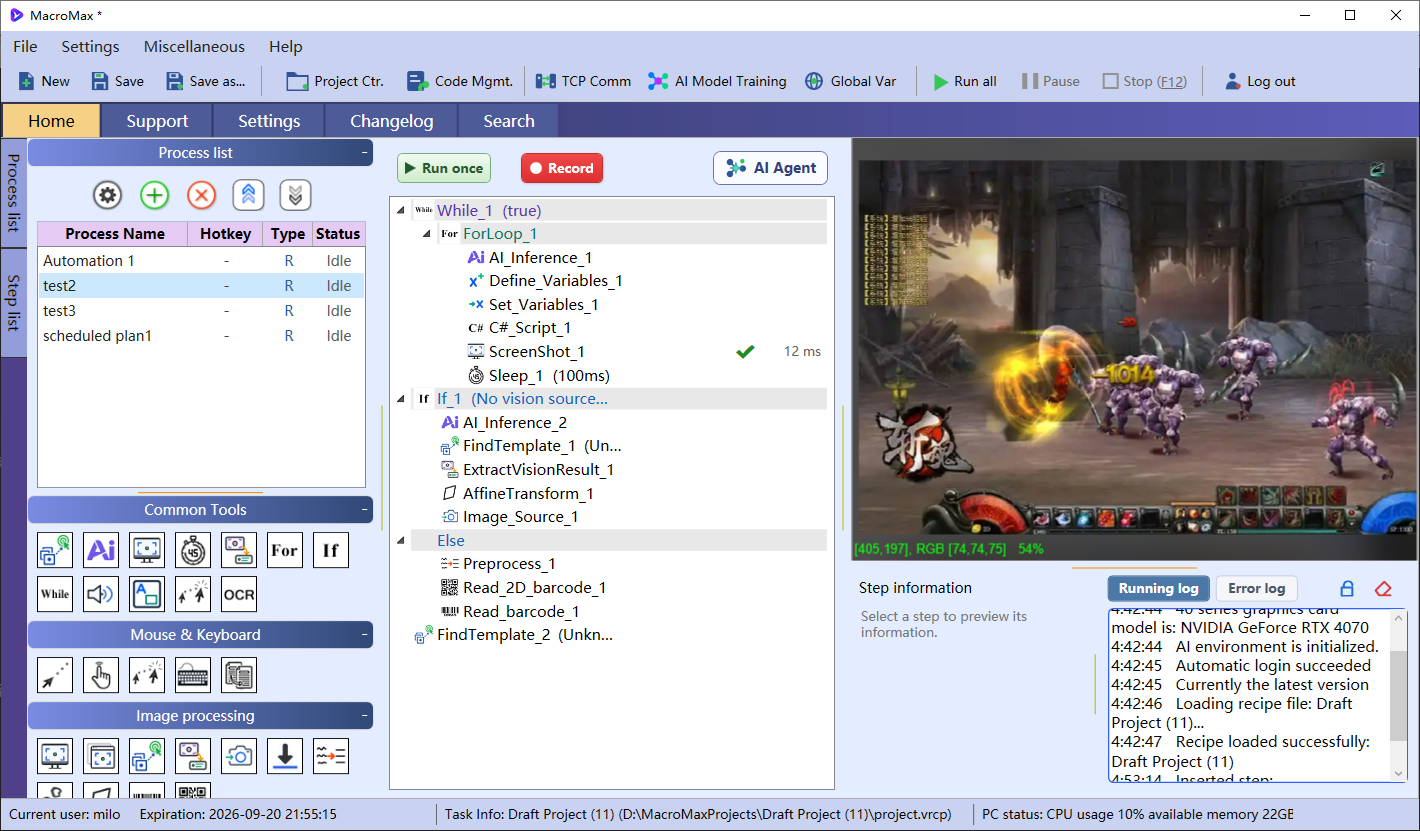
MacroMax smart auto clicker and automation workflow main window
MacroMax Main Window
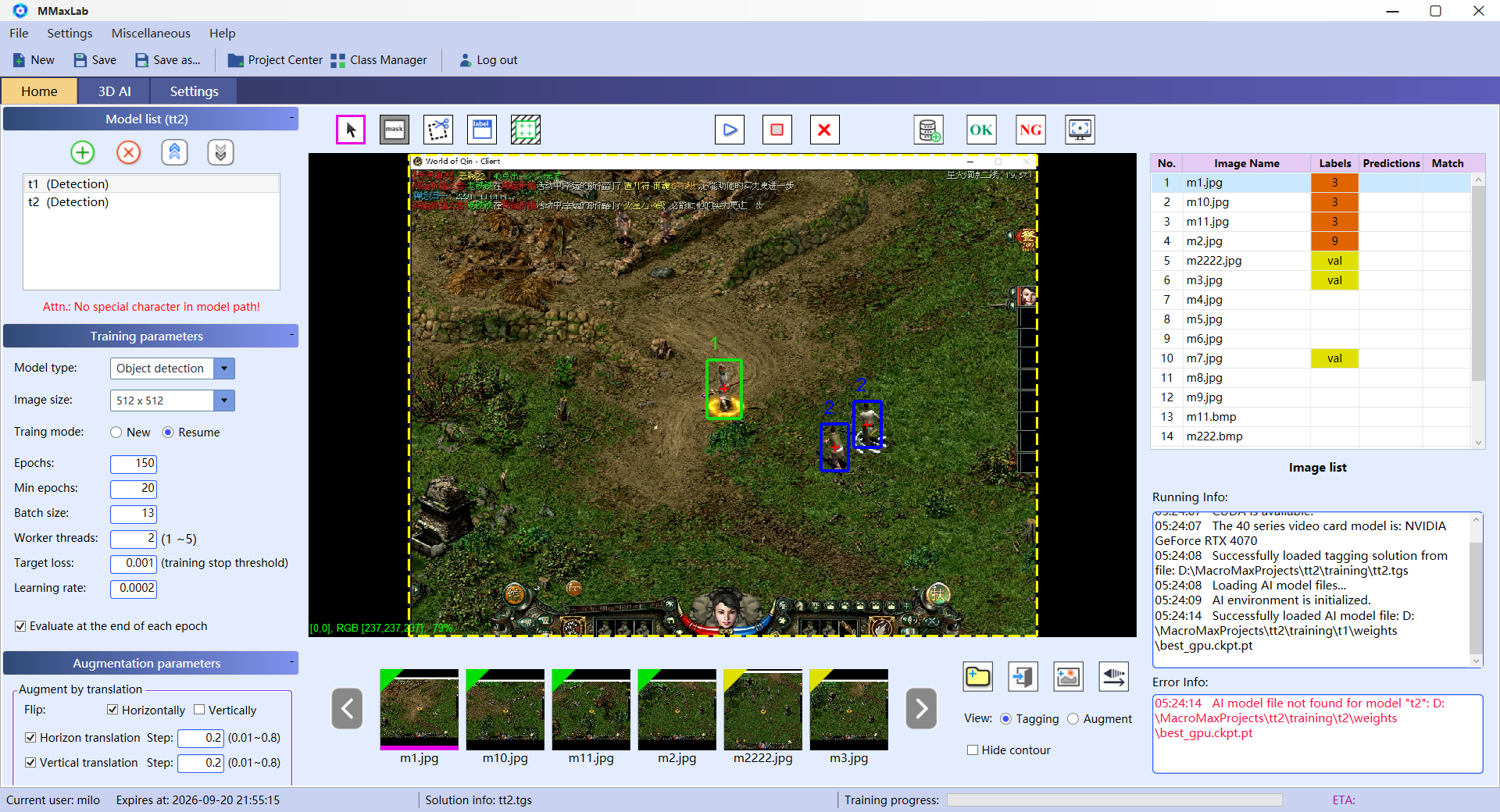
MacroMax AI training main window
MacroMax AI Training Main Window
01Mouse and keyboard recording02Recognize patterns and click03Plan routes04AI-powered detection, decisions and execution
FROM INPUT RECORDING TO VISUAL INTELLIGENCE

Core automation capabilities,
composed in one workflow.

Record the natural interaction first, then add matching, routes, logic, AI models or the Agent as the task requires. Every step stays visible and editable in the project.

01

Visual macro recording without scripts

Capture mouse and keyboard sequences with click counts, intervals, hold durations and delays. As an approachable AutoHotkey alternative, every recorded action remains visible, editable and reorderable. Use the recording as the starting point for an auto click workflow or a longer desktop automation.

Explore this feature →
02

Image recognition auto clicker

Build an automatic clicker that finds buttons or images before clicking. Give each candidate template its own algorithm, threshold, angle range and color samples, with configurable retries and disappearance checks.

Explore this feature →
03

Route networks and path planning

Build, save and load route networks in the route editor. At runtime, plan from the current location through required waypoints to a destination and produce the next direction.

Explore this feature →
04

Complete workflow logic

Build nested flows with If, For and While. Conditions can use variables, vision results and route states, while advanced expressions can be checked and test-run.

Explore this feature →
05

AI object detection

Run a trained model locally and output object counts, classes, confidence scores and regions without consuming large-model tokens.

Explore this feature →
06

MMaxLab training platform

Annotate, augment, train, run inference and validate locally in one companion app without consuming large-model tokens.

Explore this feature →
07

A practical project library

Create, search, favorite, import and switch projects in one place. Export projects for other users to import and reuse.

Explore this feature →
08

AI Agent workflow building

Describe the application, input and goal. The Agent reads the current project, plans changes and writes editable steps that you can refine and verify.

Explore this feature →
LATEST FROM MACROMAX

News & updates

News, release updates and recent developments from MacroMax.

No articles yet. New English content will appear here.
A METHOD THAT GROWS WITH THE TASK

Record it. See it. Decide. Then act.

Validate a short flow first, then combine stable actions, visual results and logic into a reusable project.

01

Record and refine

Capture a mouse and keyboard sequence, then adjust keys, coordinates, counts, intervals and waits.

02

Add vision and routes

Find targets with templates or an AI model. When movement is involved, let the route network produce the next direction.

03

Connect results with logic

Use detection outputs, variables and route states in nested If, For and While structures.

04

Verify, save and reuse

Run a small sample, review the real result, then keep the workflow in the project library with backups.

FOR MORE INVOLVED DESKTOP TASKS

When the screen changes, the workflow can still see and decide.

MacroMax brings input actions, screen state and business logic into the same workflow, ready to validate in the target environment.

WINDOWS AUTO CLICKER

Auto click changing buttons with image recognition

Use MacroMax as a visual auto clicker: locate key icons or buttons, try multiple image candidates and click the detected position instead of a fixed screen coordinate.

Template matching →
ROUTE-BASED MOVEMENT

Build a route network and choose a path from the current position

Save reusable route networks, connect starts, destinations and required waypoints, then feed route state into a continuing loop.

Route planning →
VISUAL DETECTION

Train in MMaxLab and run the model in a workflow

Annotate a small representative image set, augment training data and use the resulting model for location, classification and action.

Explore MMaxLab →
Local processing with no LLM token usage

Core automation, AI object detection, and MMaxLab training and inference run locally. Token usage occurs only when the AI Agent page triggers an OpenAI, DeepSeek, or another supported large-model API.

Switch computers without moving a licence

Your subscription is not tied to one computer. Sign in with an active subscription after switching computers; each account can be signed in and used on only one device at a time.

Export and share projects

Export automation projects for other users to import and reuse, making workflows easier to distribute, collaborate on, and deliver.

GOOD TO KNOW

A few things to know.

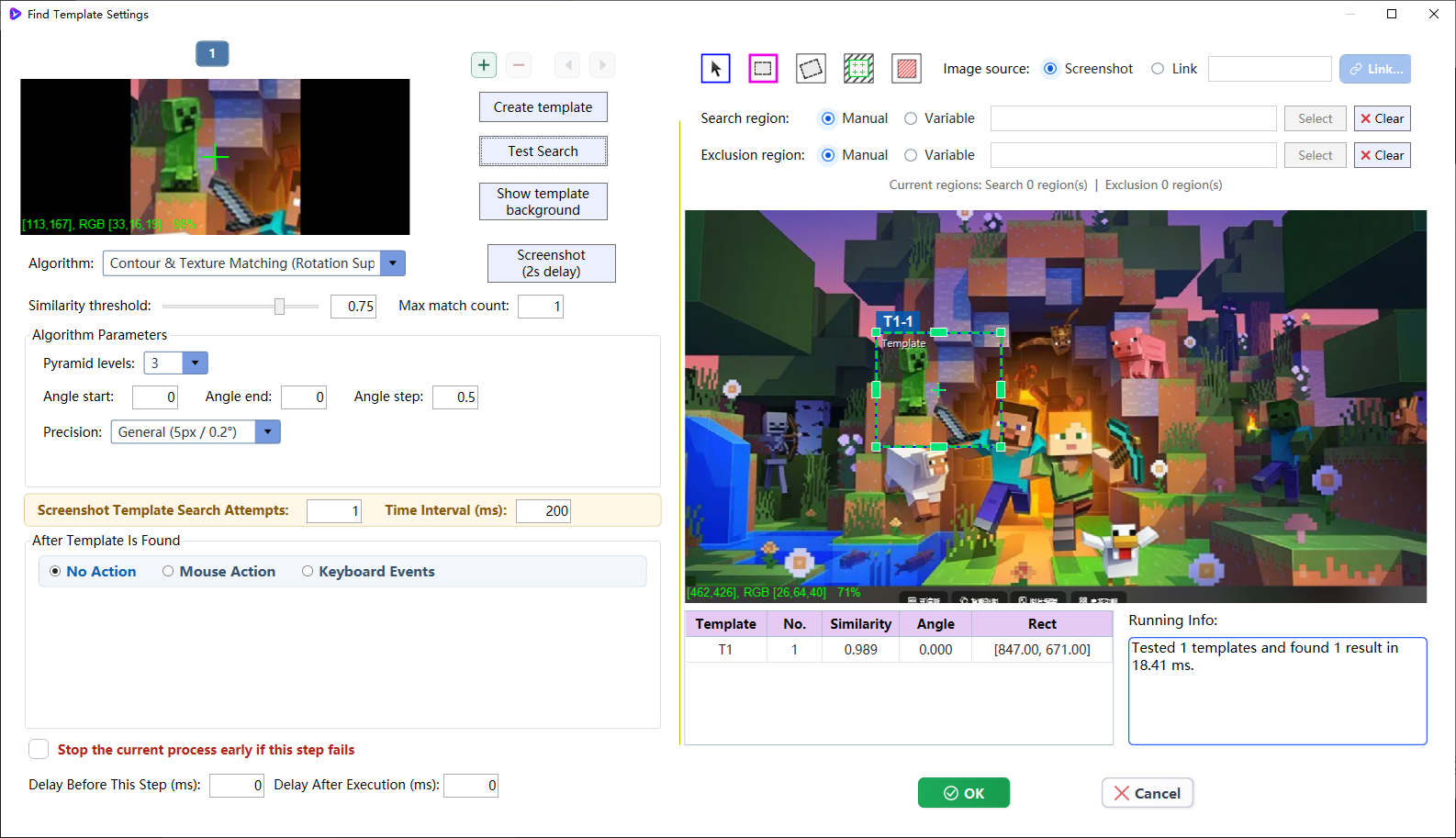
MacroMax image recognition auto clicker template editor
MacroMax Image Template Editor
Does MacroMax run on Windows?

MacroMax is a Windows desktop application. A Mac version is not offered on this website.

Is MacroMax an AutoHotkey alternative?

Yes, for people who prefer editable visual workflows over writing automation scripts. MacroMax records input and combines clicks, image recognition, conditions and loops; existing AutoHotkey scripts are not imported automatically.

Can MacroMax work as an auto clicker?

Yes. It can repeat mouse clicks at configured positions or act as an image recognition auto clicker that finds a visual target before clicking it.

Do I need to write code?

You can build workflows with visual steps and recordings. More involved tasks may need conditions, variables and testing.

What does the AI Agent do?

It helps you create and adjust workflows from a description. The resulting steps stay available to inspect and edit.

Is a website account required?

No. The MacroMax Lite installer can be downloaded directly without creating or signing in to a website account.

How does the trial work?

The current offer is a one-week trial. Check the account and subscription screens for applicable access, pricing and large-model API usage before purchasing.

Will every application work automatically?

Results depend on the target application, display setup and workflow. Start with a short test and review the output before relying on repeated runs.

Which features consume large-model tokens?

Core automation, AI object detection, and MMaxLab training and inference run locally without consuming large-model tokens. Token usage occurs only when the AI Agent page triggers an OpenAI, DeepSeek, or another supported large-model API.

Is a subscription tied to one computer?

No. After switching computers, sign in with an active subscription to continue using MacroMax. Each account can be signed in and used on only one device at a time.

Can I share an automation project?

Yes. Export a project for another user to import and reuse. The features available to the recipient still depend on their sign-in and subscription access.

MAKE YOUR NEXT MOVE

Your next repetitive task
could be your last manual run.

Download a visual AutoHotkey alternative and Windows auto clicker, then start with one small workflow.

Download MacroMax Lite (approx. 65 MB) ↗One-week trial · No account required for download